
The explosion in small CAD-aligned AI firms reminds us of a similar explosion a decade ago, when HTML5 and WebGL made it possible to run CAD in browsers. Venture capital was invested in them then, and is being invested in AI now. The past informs the future, and so it’s reasonable to expect that some of today’s AI-for-CAD vendors will go bust while others will be acquired by CAD/CAM companies; however, most CAD companies already have one or more AI tools available for their users.
Looking at the full spectrum of AI programs for CAD currently available, most fall into one of four categories:
- AI agents that will answer specific user manual-type questions and follow command prompts that relate to an open part or assembly, such as “Select all bolts smaller than 1/4 in.”
- Text-to-part generators that create 3D parts, after you enter a description like “Model a split washer with ID of 1/2 in. and OD of 5/8 in.”
- Engineering design assistants that generate 3D images, choose parts and perform engineering calculations.
- Design insight analyzers that analyze parts for manufacturability, tolerances, standards or regulatory compliance and so on.
Let’s take a look at some.
AI Agent: Onshape AI Advisor
Onshape is PTC’s Web-only MCAD system, and it offers an AI assistant that responds to user questions with answers from its documentation. The assistant uses Amazon’s Bedrock agent, because Onshape runs on Amazon servers.
To try it out, I launched Onshape in my Web browser, and then opened a demo assembly provided by PTC. I selected a part and asked AI Advisor how thick it should be. It replied with a wordy answer, too wordy for my liking.
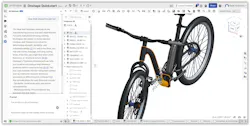
Part of it read, “Onshape’s Thickness Analysis tool can help you visualize and analyze wall thickness problems before manufacturing.” It included a link that sent me to a general “what’s new” video, not to one specific to the command.
When I asked, “Where is the Thickness Analysis tool?”, it offered another paragraph of text, this time with a link to Onshape’s help file. I would have expected it to launch the command for me, or even just highlight its icon on the toolbar.
To test out AI Advisor, you can run a free trial version of Onshape.
Text-to-Part Generator: AdamCAD
AdamCAD (or perhaps Cadam; the name varies) lets us enter text prompts to generate parametric 3D models. I asked it to create a lock washer, a deceptively simple request that I have found AI systems have difficulty modeling correctly. In this case, AdamCAD did it correctly, taking about 40 sec. Parametric sliders let me adjust its size, such as thickness and sweep angle.
This AI system works by first generating a programming script, from which the part is drawn using OpenSCAD as the geometry creation engine. Results can be exported in STL for 3D printing, DXF for AutoCAD and SCAD for OpenSCAD.
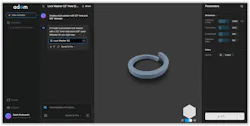
An intriguing option it offers is the selection of four foundation AI systems. Of the four, only Google’s Gemini 3.1 Pro completed my task accurately. Anthropic’s Claude Opus 4.7 and OpenAI’s GPT 5.5 were quicker, but produced hallucinations (inaccurate results). I gave up on China’s Moonshot Kimi K2.6 after waiting an hour; perhaps it is meant only for customers in China.
To date, AdamCAD raised a $4.1 million in seed round funding. A free plan allows 200 credits/day of processing. My four runs cost 176 credits; models more complex than mine would consume more credits. I have tried several text-to-part generators, and found this is to be one of the better ones. AdamCAD is worthwhile to check out if it is more convenient than accessing your parts library.
Engineering Design Assistant: LeoAI
LeoAI prides itself on what it calls the first Large Mechanical Model, trained on millions of products and engineering resources. It can combine machine parts (bolts, bearings and so on) into models that are DfMA-compliant (designed for manufacturing and assembly). It reads text, sketches, 2D images and 3D CAD files, and applies physical and engineering constraints.
LeoAI runs in a web browser, but is also available as a Windows desktop app. I think the desktop program makes calls to the Leo server, rather than perform local processing, because of how quickly it installs. You cannot test-run Leo for free, nor could I, as it requires an upfront payment of USD $99 for the first month, possibly a sign of the expense of renting AI servers. I did not hear from the Leo staff I contacted requesting a trial.
But if we could test-run LeoAI, we would find it takes text descriptions and turns them into editable 3D parametric or mesh models and technical documents. It can retrieve parts for projects from external libraries, and suggest assemblies. According to LeoAI, It can also perform engineering calculations, and suggest approaches to solving problems. As LeoAI puts it, “Bye-bye, MATLAB.”

To date, the company has secured $9.7 million in seed funding, but be aware that there are other AI systems named “Leo”, such as HelloLeo.ai, OpenLeo.ai and even a Solidworks AI by that name. The one I’m writing about can be found here.
Design Insight Analyzer: Bananaz
Bananaz emphasizes that its AI-powered Design Agent is not just an LLM, but that it understands mechanical logic with computer vision. Its abilities appear to range from simple to advanced. For instance, ask for 2 to 3 suppliers of socket head screw #24, and several suppliers would be listed with links to their websites.
More advanced applications include DfMA analysis, where the design agent returns suggestions for making machining easier.
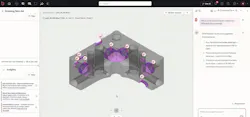
Bananaz has secured $5.3 million in funding. The firm didn’t return my requests for a demo or information, and so I was unable to test the software or learn its pricing.
The Constant That is Change
Advances in technology sometimes bring about unwanted regressions. Putting CAD software on the cloud, for instance, forced CAD vendors to charge customers recurring subscription fees, because they in turn were charged for running their code on computing providers like Amazon EC2.
In another for-instance, bringing AI to CAD has forced vendors to minimize or eliminate free trials, because of API fees paid to firms like Anthropic and Perplexity. Here are other changes that are taking place.
Switch to World Model AI. Since ChatGPT exploded on the world in 2022, large language models have dominated. They are fed text from sources both legal and illegal, from which they construct sentences stochastically: the algorithms make statistical guesses at the next words in sentences, with a 25% hallucination (errors in answers) ratio. Inaccuracy is, however, unacceptable for fields as precise as CAD and CAM.
So last year, some new AI firms began working on “world model AI” that uses the laws of physics and materials to simulate the real world—essentially digital twins with intelligence. World model AI is new enough, however, that we don’t yet how effective it is for CAD/CAM.
Increasing prices. To gain users and market awareness, AI vendors use funds from venture capital firms to offer their services at artificially low prices, as much as 1/8th the actual cost. But now, as AI vendors aim for profitability, prices are increasing and services reducing. All-you-can-use monthly plans are becoming pay-as-you-go (usage-based), and low-priority jobs run more slowly on as little as one GPU.
The AI industry sells its service in million-token tranches; a token is three-quarters of a word. As I write this in May, input prompts (questions by humans) cost between $0.20 per million tokens for an LLM like GPT-5.4 Nano, to $300 for GPT-5.4 Pro. Output tokens (answers from AI) range from $1.25 to $180. “A single high-volume chatbot can consume hundreds of millions of tokens per month, and moving workloads to higher-quality models can triple those costs,” says ROI for AI firm Cloud Zero.
Mark Burhop writes that Deloitte found “Some firms reporting that AI already consumes up to half of IT spend, and that cloud costs rose nearly 20% in 2025, primarily because of AI workloads”.
Changes to CAD/CAM. Proponents of AGI (human-level artificial general intelligence) state their software will make 50% of entry-level white-collar jobs redundant in the next [name your timeframe] years. Does that include designers and machinists? Dassault Systemes says no, insisting “Your experience are the most valuable intellectual property in this new world.”
Nevertheless, Wall Street is wondering about CAD and CAM software firms’ revenues when AI agents can replace humans doing tasks, reducing annual license payments. On the worry over headless (human-less) operations, share prices of SaaS (software as a service) firms like Autodesk and PTC fell as much as 20% this year.
On X, business consultant Tom Goodwin posted, “We should not be in love with productivity gains at the expense of competence and understanding.” Some say the AI industry is healthy; others say its circular financing is creating a bubble likely to collapse. In my opinion, once the hype settle downs, AI will become a side-extra in CAD and CAM, the way collaboration and virtual reality have become.
More content from Special Focus: CAD/CAM/CAE.
About the Author
Ralph Grabowski
Ralph Grabowski has been writing about computer-aided design since 1985, and is the author of 240 books on the subject. He received his degree in engineering from the University of British Columbia.
Voice Your Opinion!
To join the conversation, and become an exclusive member of Machine Design, create an account today!
 Leaders Logo
Leaders relevant to this article: