CAE Automation: From AI Prompt to Simulation
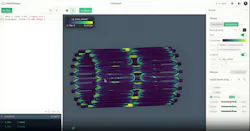
According to Peter Mortier, CEO of HelloTriangle, FEA, CFD and CAE applications in general suffer from a serious productivity problem. As capable as solvers and post-processors have become over decades of development, they still require engineers to perform hours of tedious button clicking to prep CAD geometry before any genuine analysis gets done.
“For FEA/CFD engineers, the primary challenge is not running the solver itself; it is the significant amount of repetitive, manual work surrounding simulations,” he explains. “Engineers typically spend substantial time preparing models, defining boundary conditions, extracting results and documenting findings. This becomes especially time-consuming in design-of-experiments (DOE) studies, sensitivity analyses or when running large batches of simulation variants that have different designs or load cases.”
“Most of this work is still performed through complex desktop GUIs that require extensive manual interaction,” he adds. “This slows iteration cycles and ties highly skilled engineers to low-value, repetitive tasks rather than engineering decision-making. Automation is possible in some cases, but it is often complex to implement.”
READ MORE: Why Analyzing Large Automotive HPDC Parts Using Traditional CAE Falls Short
As Mortier mentions, there is a short cut around the tedium, but it entails writing a script or code that complex software like an CAE application can programmatically follow to automate repetitive tasks unattended—similar to recording a macro, but with greater flexibility and potential. (Check out this in-depth look at the full potential of CAE scripting).
CAD applications have long supported proprietary scripting languages (e.g., AutoLisp for AutoCAD, CATScript for CATIA), but most CAE packages have standardized on numerically adept languages like Matlab or, more commonly, the open-source Python.
While powerful, scripting does require mastery not only of a CAE application itself but a similar fluency in a scripting language. Given the added time, effort and complexity that writing and de-bugging code from scratch requires, those tempted to script may shy away while power users apply it sparingly.
How it Works
That’s where HelloTriangle’s online tool of the same name comes into the picture, Mortier says. Run within a web browser, the tool translates CAE specific plain language prompts into Python-based CAE scripts, thereby eliminating the need for simulation analysts to become full-blown coders.
For example, in a typical HelloTriangle workflow, users might upload an STL file to HelloTriangle. Once imported, the mesh displays in the application’s 3D environment so that users can visually check that their AI prompts are producing the desired results.
Users can then progressively prompt the HelloTriangle AI to add to or refine the imported mesh (e.g., convert triangles to quads), as well as define materials, loads and boundary conditions. Once complete, users can then export the modified mesh and save the AI-generated Python script for use with an FEA or CFD application.
While HelloTriangle can generate mesh geometry from scratch, Mortier points out that it isn’t a text-to-CAD tool or a “blackbox” generative AI, in which the same series of AI prompts often produces unpredictable results each time they’re processed.
“In engineering workflows, reproducibility, transparency and control are essential,” he says. “For this reason, HelloTriangle generates executable Python code from AI prompts rather than producing opaque outputs. The generated code forms a fully inspectable and reproducible workflow that engineers can read, verify, modify, version-control and re-run. This is critical in professional FEA/CFD environments, where every step in the process must be traceable.”
In addition, he says HelloTriangle isn’t the same as a text-to-code LLM like Claude Code. While the application’s AI does rely on an external LLM, it serves largely as a foundational layer. To that, HelloTriangle adds engineering-focused Python commands for tasks such as parametric mesh generation, simulation setup, result extraction and post-processing.
“Our integrated AI agent leverages retrieval-augmented generation, or RAG,” he says. “That means that the underlying LLM incorporates HelloTriangle’s internal documentation and a curated library of validated engineering workflow examples. This helps ensure that the Python code HelloTriangle generates is aligned with real-world simulation practices rather than generic coding patterns.”
Text-to-Collaboration
In addition to automating pre-processing, HelloTriangle can also streamline post-processing tasks such as results extraction, simulation reporting and collaboration, Mortier says. Running a Python script, users can extract specific frames and field data from an Abaqus ODB file, for example, and convert it into the HelloTriangle’s native HT5 format.
READ MORE: CAD Automation: Manual Design Workflows Don’t Scale
With this file, HelloTriangle can display the imported mesh geometry along with post-processing results (e.g., stress, strain, etc.) within HelloTriangle’s 3D environment. Users can then prompt the AI to show all results, highlight certain fields or display only those regions where values fall within a specified range.
The resulting visualization can then be saved as an interactive 3D “scene” that resides in a HelloTriangle user’s account and can be shared as a link with others. Users can also export scenes as plain HTML code that renders in a web browser.
“Traditionally, engineers spend considerable time exporting screenshots, preparing plots and assembling presentations for stakeholders who do not have access to native CAE tools,” he says. “HelloTriangle replaces this with browser-based interactive 3D sharing, enabling teams, managers, customers or suppliers to explore simulation results directly through a single link.”
Using imported post-processing results, HelloTriangle’s web-based application allows users to create interactive 3D visualization or "scenes" that can be shared as a link or exported as plain HTML code that renders in a web browser (above).
(Image source: Prof. Chiastra of Politecnico di Torino and HelloTriangle)
HelloTriangle currently offers two account tiers, free and basic (although Professional and Enterprise editions are in the works, Mortier says). A free account provides full access to the tool and creation of unlimited 3D scenes but limits AI prompts to 10 per day (30/month) and script runs to 20 daily (100/month). For roughly USD$55 a month, basic account users get an unlimited number of script runs and 200 AI prompts per month. All scenes created stay live and accessible, even after subscription ends.
READ MORE: Crunching the Numerics: Computer Aided Engineering
Ultimately, Mortier envisions HelloTriangle as an agnostic application that supports as many different brands of CAE applications as possible. At its present state of development, the online app currently supports exporting meshes and generating complete solver input files from Ansys’ multiphysics suite LS-DYNA and Dassault Systemes’ FEA software Abaqus. In addition, only Abaqus results can be imported and analyzed within HelloTriangle. However, the platform does support the VTU open format for visualization and post-processing.
“Over the coming year, we plan to expand integration to include additional leading FEA and CFD solvers,” Mortier says. “On the visualization side, we are expanding the browser-based 3D environment with features such as animations and more advanced result exploration capabilities. For collaboration, we are developing features such as annotations directly on shared 3D models and collaborative workflow/script editing.”
More content from Special Focus: CAD/CAM/CAE.
About the Author
 Mike McLeod
Mike McLeod
Senior Editor, Machine Design
Mike McLeod, senior editor of Machine Design, is an award-winning business and technology writer with more than 25 years of experience. He has covered the full spectrum of mechanical engineering, from industrial automation, aerospace and automotive, to CAD/CAE, additive manufacturing, linear motion and fluid power.
Voice Your Opinion!
To join the conversation, and become an exclusive member of Machine Design, create an account today!
 Leaders Logo
Leaders relevant to this article: